模拟Windows 7 OOBE阶段黑屏的下方光斑的动画:
https://chatgpt.com/share/6a75f8ef-3c4c-83ee-a67b-543479a0a3c8
https://chatgpt.com/share/6a75f910-2ed8-83e8-a833-dbfc9adc64be
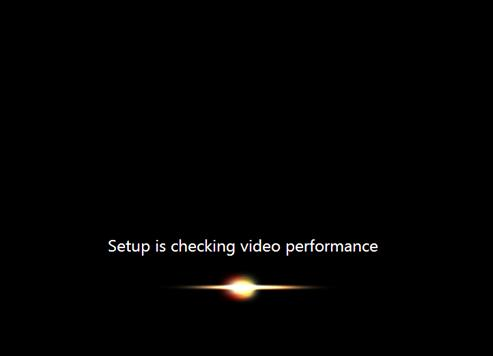
<!DOCTYPE html>
<html>
<head>

<style>

html,body{
    margin:0;
    height:100%;
    background:#000;
    display:flex;
    justify-content:center;
    align-items:center;
}


#bar{

    font-family:
    Consolas,
    "Cascadia Mono",
    monospace;

    font-size:22px;

    letter-spacing:1px;

}

span{
    display:inline-block;
}

</style>

</head>


<body>


<div id="bar"></div>


<script>


const bar=document.getElementById("bar");


/*
    可调参数

*/


const chars=50;


/*
    静态背景范围

*/

const backgroundStart=0.10;
const backgroundEnd=0.90;


/*
    动画运行范围

*/

const animationStart=0.10;
const animationEnd=0.90;


let cells=[];


for(let i=0;i<chars;i++){

    let s=document.createElement("span");

    s.textContent="█";

    bar.appendChild(s);

    cells.push(s);

}


let frame=0;


function gaussian(x,c,w){

    return Math.exp(
        -Math.pow(
            (x-c)/w,
            2
        )
    );

}


/*
    静态背景层

*/

function background(x){


    if(
        x<=backgroundStart ||
        x>=backgroundEnd
    ){

        return 0;

    }


    let t=
    (x-backgroundStart)/
    (backgroundEnd-backgroundStart);


    return Math.pow(
        Math.sin(Math.PI*t),
        3
    )
    *
    0.18;


}


function render(){


    let phase=
    (frame%300)/300;


    /*
        动态光晕位置

        映射到指定范围

    */

    let pos=
    animationStart+
    phase*
    (
        animationEnd-
        animationStart
    );


    /*
        光晕生命周期

    */

    let life=
    Math.exp(
        -Math.pow(
            (phase-0.55)/0.22,
            2
        )
    );


    for(let i=0;i<chars;i++){


        let x=
        i/(chars-1);


        /*
            背景

        */

        let base=
        background(x);


        /*
            移动光晕

            宽度也是相对于整体

        */

        let halo=
        gaussian(
            x,
            pos,
            0.075
        )
        *
        life;


        let light=
        base+
        halo;


        light=Math.min(
            light,
            1
        );


        let gray=
        Math.floor(
            light*255
        );


        cells[i].style.color=
        `rgb(${gray},${gray},${gray})`;

    }


    frame++;

    requestAnimationFrame(render);

}


render();


</script>

</body>
</html>
第二个,从左到右脉冲、发射效果的动画,适合收发数据的场景
https://chatgpt.com/share/6a75f8b2-b2cc-83e8-8125-748796dd2cc2
<!DOCTYPE html>
<html>

<head>

<meta charset="UTF-8">

<style>

html,body{

    margin:0;
    height:100%;

    background:#000;

    display:flex;
    justify-content:center;
    align-items:center;

}


#bar{

    font-family:
    Consolas,
    "Cascadia Mono",
    monospace;

    font-size:22px;

    letter-spacing:1px;

}


span{

    display:inline-block;

}

</style>

</head>


<body>


<div id="bar"></div>


<script>


const chars = 60;

const bar =
document.getElementById("bar");


let cells=[];


for(let i=0;i<chars;i++){

    let s=document.createElement("span");

    s.textContent="█";

    bar.appendChild(s);

    cells.push(s);

}


// 数据包列表

let packets=[];


/*
    模拟数据到达

    一个packet代表一次数据块

*/

setInterval(()=>{


    packets.push({

        t:0,


        // 初始速度 + 随机变化

        speed:
        0.009+
        Math.random()*0.003,


        power:
        0.8+
        Math.random()*0.2,


        size:
        0.018+
        Math.random()*0.012

    });


},260);


function gaussian(x,c,w){

    return Math.exp(

        -Math.pow(
            (x-c)/w,
            2
        )

    );

}


/*
    非线性运动

    初速度存在
    中后段加速

*/

function motion(t){


    return (
        0.10*t+
        0.90*Math.pow(
            t,
            1.55
        )
    );

}


function render(){


    let light=
    new Array(chars).fill(0);


    for(let n=packets.length-1;n>=0;n--){


        let p=
        packets[n];


        p.t += p.speed;


        let t=p.t;


        if(t>=1){

            packets.splice(n,1);

            continue;

        }


        let pos=
        motion(t);


        /*
            亮度

            中间最亮

        */

        let energy=
        Math.sin(
            Math.PI*t
        );


        energy=
        Math.max(
            0,
            energy
        );


        for(let i=0;i<chars;i++){


            let x=
            i/(chars-1);


            // 主数据包

            light[i]+=
            gaussian(
                x,
                pos,
                p.size
            )
            *
            energy
            *
            p.power;


            // 短尾迹

            for(let k=1;k<=5;k++){


                let tail=
                pos-
                k*0.014;


                if(tail<=0)
                    continue;


                light[i]+=
                gaussian(
                    x,
                    tail,
                    0.006+k*0.002
                )
                *
                energy
                *
                p.power
                *
                Math.pow(
                    0.35,
                    k
                );

            }


        }


    }


    for(let i=0;i<chars;i++){


        let value=
        Math.min(
            1,
            light[i]
        );


        let gray=
        Math.floor(
            value*255
        );


        cells[i].style.color=
        `rgb(${gray},${gray},${gray})`;


    }


    requestAnimationFrame(render);


}


render();


</script>


</body>


</html>